Item Landed Costs
Upon posting a receipt (Purchase or Transfer) for Items with associated Landed Costs, the Expected Landed Costs are posted to the Landed Cost Ledger and the relevant Inventory Accounts, depending on the Cost Treatment set up against each "Landed Cost Type".
Costs will be posted as detailed in the Financial Postings section of the user guide and will post to the relevant accrual account for the Landed Cost Type, which will remain as expected until an invoice for the Landed Cost is posted.
Note: For Landed Cost Types with the Default Cost Treatment, the accrual is only posted to the General Ledger when Expected Cost Posting to G/L is set on the "Inventory Setup" screen.
The following points apply when a receipt is posted:
-
a purchase receipt posts the Document Landed Costs held on each received Purchase Order line, including receipts posted through a "Warehouse Receipt" and receipts created by posting the shipment of a drop shipment sales order
-
a transfer receipt posts the Document Landed Costs held on each received Transfer Order line, but only when Incoterm Allocation Enabled is set on the "Landed Cost Setup" screen and only for costs with an Incoterm Type of Transfer. Nothing is posted when the Transfer Order is shipped
-
if Re-calculate Rates on Receipt is set on the "Landed Cost Setup" screen, the landed cost rates for the lines being received are retrieved again using the Posting Date before the receipt is posted. Landed costs that you removed from a line are not added back
-
before a transfer receipt is posted, any Charge Item landed costs are checked for missing dimension values, invalid dimension combinations and missing inventory posting setup for the Item and Transfer-to Code, so that an error stops the whole receipt rather than posting it without its landed cost
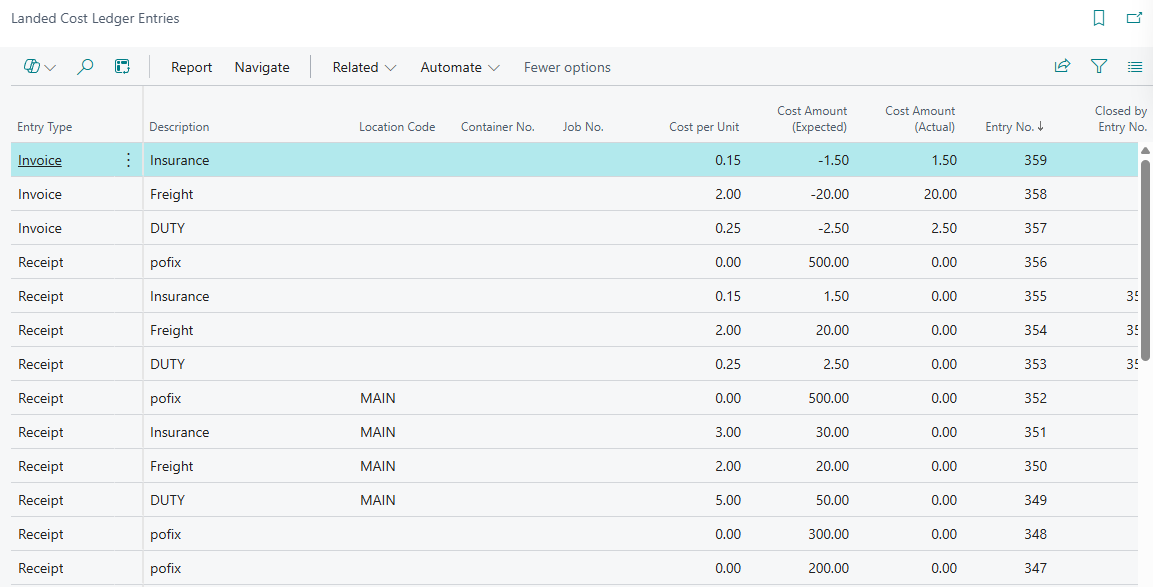
For each financial posting made by the Clever Landed Cost solution, the cost will be tracked through the "Landed Cost Ledger Entries" screen. Each entry in the ledger is linked to an associated Item Ledger Entry for the stock receipt. Furthermore if you are using a Landed Cost Type that is set up to use the Charge Item Cost Treatment then the "Value Entries" screen will also show the Landed Cost field set for the item charge value entry.
You are able to view the "Landed Cost Ledger Entries" from the following places:
-
Tell me search
-
Find entries from either the "Posted Purchase Receipt" or "Posted Transfer Receipt" screen, where the entries are listed as Landed Cost Ledger Entry
-
Preview Posting on a document, before you post it
-
the LC Cost Amount (Expected) and LC Cost Amount (Actual) field drilldowns on the "Item Ledger Entries" screen
Landed Cost Fields on Posted Entries and Documents
The following fields are added to the "Item Ledger Entries" screen.
| Landed Cost Container No. | The "Landed Cost Container" of the received line. |
| Landed Cost Vehicle ID | The vehicle assigned to the "Landed Cost Container". |
| Landed Cost Job No. | The Job No. of the "Landed Cost Container". |
| LC Cost Amount (Expected) | The total expected landed cost for the entry. Drill down to see the "Landed Cost Ledger Entries". |
| LC Cost Amount (Actual) | The total invoiced landed cost for the entry. Drill down to see the "Landed Cost Ledger Entries". |
| Landed Costs Open | Shows that the entry still has landed costs waiting to be invoiced. |
The Landed Cost Vehicle ID is also shown on the lines of the "Posted Purchase Receipt", "Purch. Receipt Lines" and "Get Receipt Lines" screens. It is filled in when the receipt is posted from a "Warehouse Receipt" created for a "Landed Cost Container". The lines of the "Posted Transfer Shipment" and "Posted Transfer Receipt" screens have hidden Landed Cost Container No., Landed Cost Vehicle ID and Landed Cost Job No. fields that you can add using Personalise.
Document Fixed Costs
Fixed Costs that are assigned to either the Purchase Order, Transfer Order or Landed Cost Container will be posted automatically at the point that the source document is considered 'Completely Received'. This is because the fixed cost will be shared across all Items that are received for the document and therefore the share calculations cannot be performed until the final receipted quantities are confirmed.
For a Purchase Order this is when no Item line has an outstanding quantity left to receive. For a Transfer Order this is when no line has a quantity left in transit after the receipt is posted. For a Landed Cost Container this will be when the Status is set to Closed, as this happens automatically when the Landed Cost Container is fully received. As with Item level costs, the system will also post the relevant financial and landed cost ledgers into Business Central.
Fixed Costs are posted as item charge value entries, using the Charge Item No. of the "Landed Cost Type". Fixed Costs for a Purchase Order or a Landed Cost Container are posted as expected cost against the purchase receipt entries, and Fixed Costs for a Transfer Order are posted as actual cost against the transfer receipt entries.
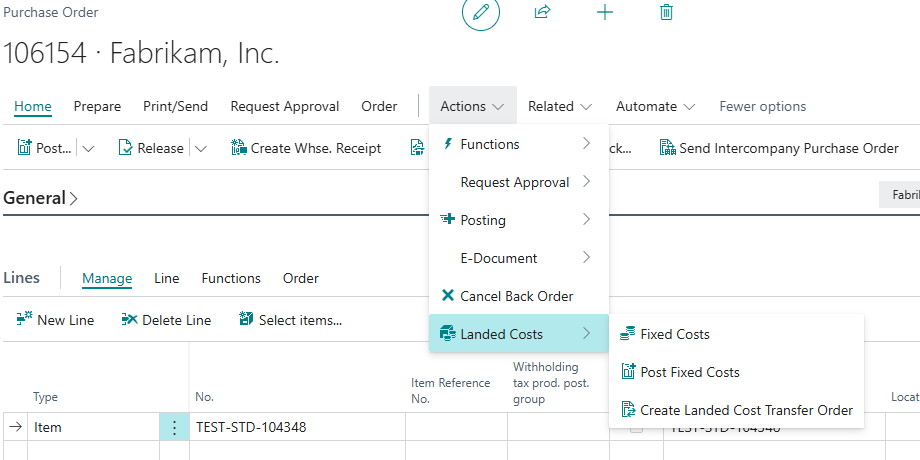
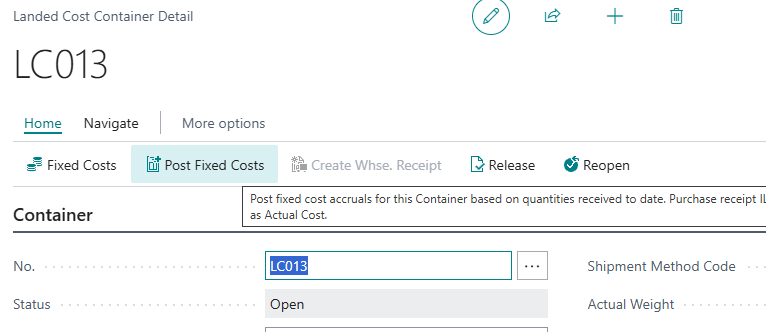
If for some reason the document will not be fully received (in relation to what was originally expected) then it is possible to post the Fixed Costs manually, based on the current receipted quantities. To do so you can use the Post Fixed Costs action that is available from the Landed Costs menu on the "Purchase Order" and "Transfer Order" screens and directly from the Home menu of the "Landed Cost Container Detail" screen, as shown below.
If there are no Fixed Cost lines, no receipts have been posted yet, or all of the Fixed Costs have already been accrued, Post Fixed Costs shows a message and nothing is posted.
The system will use the Calculation Type of the Fixed Cost when calculating how the fixed cost amount should be shared across the receipted Items:
-
Weight (KG) shares the cost by the Gross Weight on the "Item Card" (or the Net Weight if there is no gross weight) multiplied by the quantity received
-
Volume (M3) shares the cost by the Unit Volume on the "Item Card" multiplied by the quantity received
-
Percent shares the cost by the inventory value of each receipt, excluding landed costs
-
any other Calculation Type shares the cost by the quantity received
Items with Exclude from Fixed Cost set on the "Item Card", and lines with Exclude from Fixed Cost set on the document, do not receive a share. Any rounding difference is added to the last Item that receives a share.
Example 1 - Quantity Calculation Type
Purchase Order has a Fixed Cost of 100.
Two Items are received.
-
Quantity = 75
-
Quantity = 25
The system will assign the following.
-
75 (100 x (75/100))
-
25 (100 x (25/100))
Example 2 - Weight Calculation Type
Purchase Order has a Fixed Cost of 100.
Two Items are received.
-
Quantity = 50, Gross Weight on the "Item Card" = 2 (total weight 100)
-
Quantity = 100, Gross Weight on the "Item Card" = 4 (total weight 400)
The system will assign.
-
20 (100 x (100/500))
-
80 (100 x (400/500))
When Fixed Costs have been posted against the Purchase Order and Transfer Order receipted quantities the Fixed Cost Accrued field will be set on the document and you cannot post additional fixed costs. Any adjustments will therefore have to be dealt with manually.