On the Sales Order, sales lines should be created as normal.
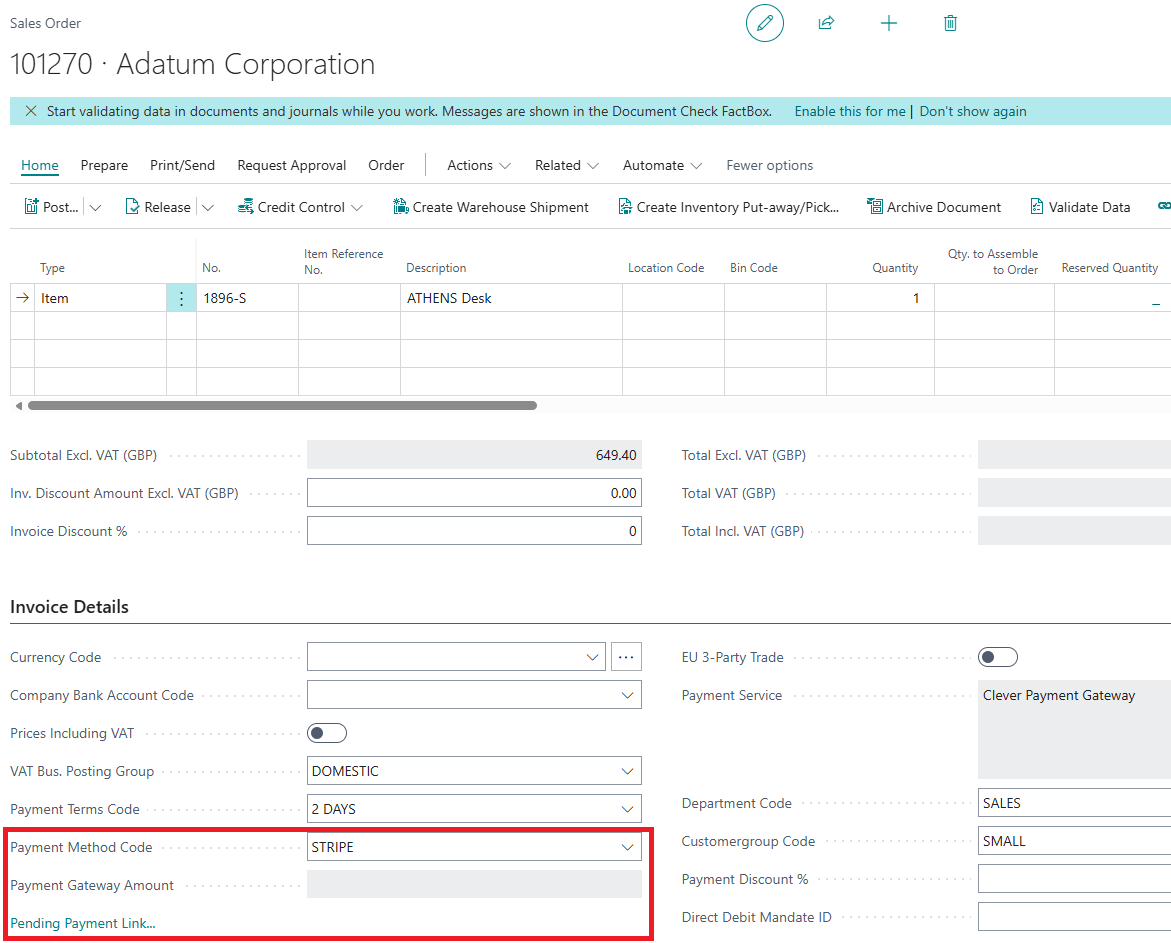
A Payment Provider Account will be pulled through from the Customer Card with the Payment Method Code if one has been set. The Payment Gateway Amount field will be empty initially but will be completed after payment has been taken, showing the amount received through the Payment Gateway. This will update if more than 1 payment is made.
In addition to this, there is a Payment Gateway Status visible on the Invoice Details FastTab. The statuses include:
- 'No Payment Link' - No Payment links have been processed for this sales document
- 'Pending Payment Link' - A Payment link has been created but not yet emailed
- 'Paid Payment Link' - A payment link was created and the payment made
- 'Failed Payment Link' - A payment link was created but the payment failed
If you click on the status whilst in Pending, Paid, or Failed, you can view the Payment details and payment link. If you select the status whilst 'No Payment Link', you'll get a message come up like below asking if you'd like to create the link. Clicking 'Yes' will create the Payment Link and clicking 'No' won't do anything and keep the status as before.
Note: Sales documents with prepayment discount can result mismatch in issued payment and actual payment. Payment terms can offer discounts if paid within a window of invoicing, however this has the potential of causing issues on unposted documents with payments being taken without any discount (which can change up until the invoice is posted). Therefore, we do not support payment discount on sales documents alongside using Payment Gateway.