From Version 5.0.0 of Clever Landed Costs there is functionality available to enable you to allocate costs to Inventory based on the Incoterms (Shipment Method Codes) you have agreed with the Vendor. As part of this change the ability to register landed costs against Transfer Order receipts has also been introduced.
Note: in order to use this functionality you must enable the Incoterm Allocation Enabled setting on the "Landed Cost Setup" screen. Landed Costs are only calculated on Transfer Orders when this setting is enabled.
When you enable the setting, you are asked whether you want to initialise the Shipment Method matrix with default values. If you answer yes, choose the default allocation (Not Applied, Purchase or Transfer) to apply to every combination of Shipment Method and Landed Cost Type. You can then change individual values in the matrix.
With the functionality enabled, the Transfer Variance Account is also shown on the "Landed Cost Types" screen.
Landed Costs Incoterms
Select Landed Cost Incoterms from the menu ribbon of the "Landed Cost Setup" screen, which will open the "Landed Costs Incoterms" matrix screen.
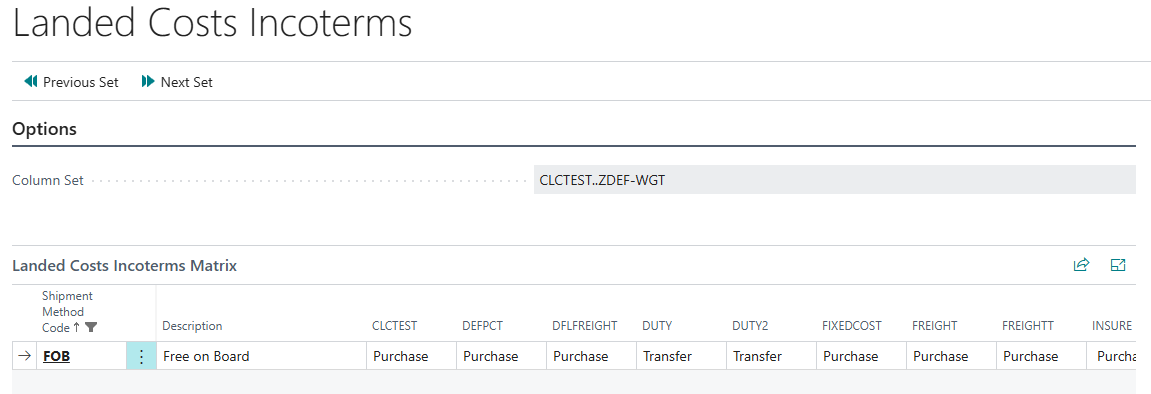
Within the "Landed Costs Incoterms" screen you will see the list of Shipment Method Codes (as set up in Business Central) as rows, with their Description, and then each Landed Cost Type as a column. The (Blank) row is used to select the relevant rule where no Shipment Method Code is populated on the Purchase or Transfer Order.
Up to 32 Landed Cost Types are shown at a time. The Column Set field shows the range of Landed Cost Types currently displayed, and you can use Previous Set and Next Set from the Process menu to move between them.
For each combination of Shipment Method and Landed Cost Type the following values can be selected.
| Blank | Bypasses the calculation of the Landed Cost. |
| Purchase | Calculates the Landed Cost on the Purchase Order and posts accruals on receipt of the Purchase Order. |
| Transfer | Calculates the Landed Cost on the Transfer Order and posts accruals on receipt into the final Location. |
If a Shipment Method has no value for a Landed Cost Type (for example a Shipment Method created after the matrix was initialised), the value in the (Blank) row for that Landed Cost Type is used. If there is no value in either, the Landed Cost is not calculated, so remember to complete the matrix when you add a new Landed Cost Type or Shipment Method.
Note: the matrix controls which Landed Cost Rules are applied to documents. Fixed Costs are not filtered by the matrix; use the Shipment Method Code on the Fixed Cost Setup instead.
The power of this functionality is that you can control when to post the liability for each Landed Cost based on the trading agreement.
An example being that if you are importing goods under an FOB agreement you are responsible for certain costs (e.g. Insurance) as soon as goods are loaded onto a Vessel in the Port of Origin, so would likely accrue for Insurance costs as part of the Purchase Order receipt, yet for Duty you would only accrue the cost once transferring off the Vessel into the Port of Destination. Previously in Clever Landed Costs all costs had to be posted against the Purchase Order.
For more about calculating and posting Landed Costs on transfers, see Transfer Orders.