For the Items that are assigned to a Landed Cost Container it is possible to see what fixed costs have been assigned against the Container, and what has been posted for them, from the Statistics FastTab of the "Landed Cost Container Detail" screen as shown below. The same FastTab is also shown on the "Closed Landed Cost Container Detail" screen.
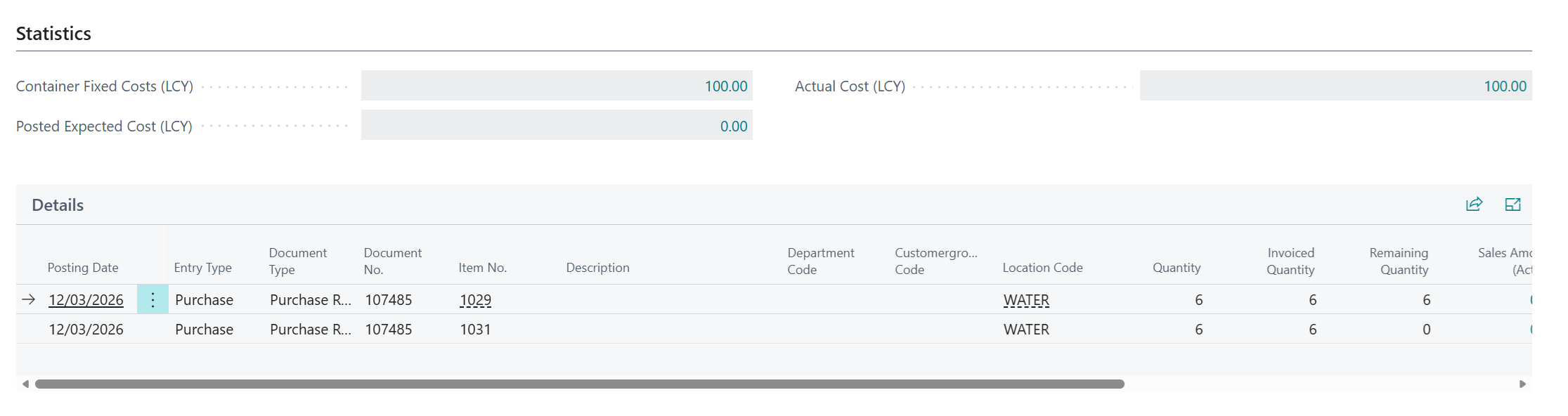
The following information is shown.
| Container Fixed Costs (LCY) | This shows the value of fixed costs that have been assigned to the Landed Cost Container and will be shared across the relevant Items. Drill down on the value to view the Fixed Costs in the "Document Fixed Costs" screen (read-only). |
| Posted Expected Cost (LCY) | When the Container Fixed Costs are accrued and assigned to Inventory as Expected Cost, this field will show the total amount posted for the Container. Drill down on the value to view the related "Landed Cost Ledger Entries". |
| Actual Cost (LCY) | When the Container Fixed Costs are Invoiced and assigned to Inventory as Actual Cost, this field will show the total amount posted for the Container. Drill down on the value to view the related "Landed Cost Ledger Entries". |
Note: these figures include only the fixed costs held against the Container. Landed costs calculated for the individual Items on the Purchase Lines are not included.
The Delivery FastTab of the "Landed Cost Container Detail" screen also shows two indicators. Fixed Cost Accrued is ticked when all fixed costs for the Container have been accrued, and Fixed Cost Applied is ticked when all fixed costs for the Container have been fully applied as actual cost. Further information on Container Fixed Costs can be found in Fixed Cost Assignment.