There are many places within Clever Quality where the Quality Status can be found. This is to help Users easily view the Quality Status and make better business decisions for them.
Item Tracking Lines
The first example of where this data can be viewed is within the Item Tracking Lines.

Here you'll see Quality Status can be viewed for Serials, Lots and Package No's as well as confirming the No of Outstanding Quality Orders. Once a User populates the Serial/Lot/Package No field, the associated Quality Status field will be populated. Clicking into the Status fields (i..e the 'IN PROCESS' one above) will open the list page for the Serial/Lot/Package No's showing the relevant entry. Clicking into the value for Outstanding Quality Orders will open a filtered list page of the Quality Orders that are outstanding for this Serial/Lot or Package No.
Bin Contents
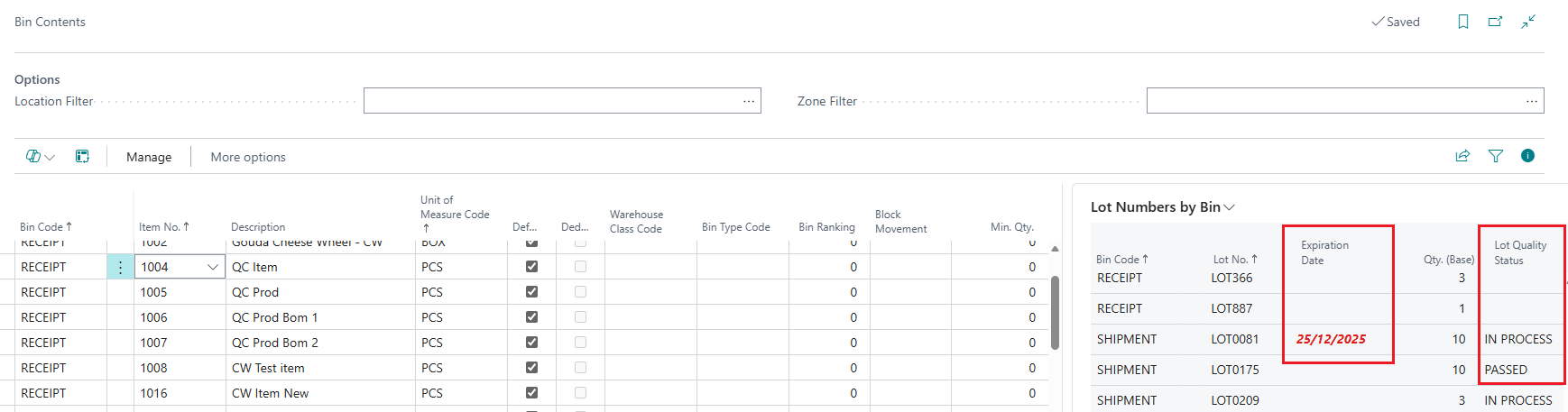
Opening the Bin Contents page will show both the Lot Numbers by Bin and Serial Numbers by Bin as Factboxes.
Within these, you can view the Bin Code, Lot/Serial Number, Expiration Date, Qty (Base) and Lot/Serial Quality Status. This helps when looking at your bin contents and needing to know the current Quality Statuses and to see if anything is still outstanding or failed where further action may be needed.