The "Phys. Inventory Journal" is used to record inventory adjustments based on physical count results. In Clever WMS Containers, this journal automatically calculates and displays container information based on the items and quantities you enter, ensuring that physical inventory records maintain consistency with container tracking.
Container Information in Physical Inventory Journal
The physical inventory journal integrates container tracking by automatically calculating which containers hold the items being recorded.
- When you enter an item (and optionally variant, lot, or serial number) and then enter a Bin Code, the journal queries the container contents to identify which container holds that inventory in that bin.
- If exactly one container matches the item and bin combination, the Container No. field is automatically populated with that container.
- If an item exists in multiple containers in the same bin, the container field remains empty and you must manually enter or look up the correct container.
- The container information ensures physical inventory adjustments are recorded against the correct container.
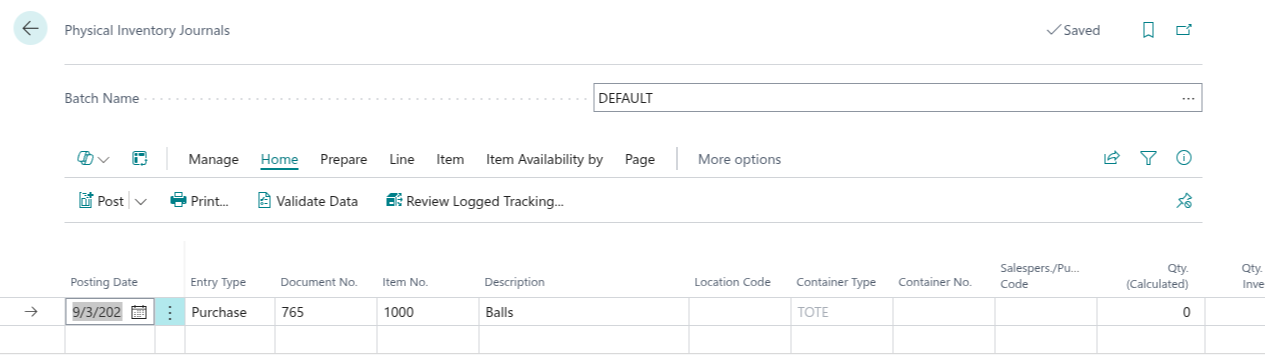
How Physical Inventory Calculates Container Information
The application uses the item characteristics to locate the container, triggered when you enter a bin code:
- If only one container contains the specific item and variant/lot/serial combination in the location and bin, that container is selected automatically.
- If the item exists in multiple containers in the same bin, the container field remains empty and you must manually select the correct container using the lookup.
- The location and bin context from the journal line narrows down which containers are searched and matched.
- The calculation is triggered when you enter or change the Bin Code field.
When Container Information is Calculated
Container calculation applies when:
- The item requires container tracking at the location being counted.
- The location or bin is set up for container tracking.
- The item exists in one or more active containers in the specified location/bin.
Note: If no container is found matching the item and location context, the container field remains empty and you can manually enter or look up a container number if needed.
Manual Container Selection
You can also manually enter or look up the container if the automatic calculation does not provide the expected result:
- Use the container lookup to see all active containers at the location.
- Filter the lookup by container content to find the container holding specific items.
- This is useful if the physical count found items in an unexpected container.
- Manual entry allows correction of systems records that may have incorrect container assignments.
Recording Counted Quantities
The physical inventory journal workflow is:
- Enter the Item No., Location Code, and Bin Code. Optionally enter Variant Code, Lot No., or Serial No. as found during physical count.
- The container field is automatically populated if only one container matches the item/variant/lot/serial combination in that bin. If multiple containers match, you must manually enter or look up the correct container.
- Enter the Qty. (Phys. Inventory) - the quantity you counted physically.
- The system calculates the difference between counted quantity and system record.
- The quantity adjustments are generated when the journal is posted.
Container Variance Analysis
When a container is recorded in the physical inventory journal, you can identify discrepancies at the container level:
- Compare total counted quantity against the system's total for that container.
- Identify containers with significant variances that may require investigation.
- Determine whether variances suggest picking errors, system data inaccuracy, or shrinkage.
Empty Containers in Physical Inventory
During physical inventory, if you find a container that is physically empty but recorded as active in the system:
- Create a physical inventory line with the container No. and a quantity of zero.
- When posted, this adjustment removes all inventory from the container, which may trigger the empty container removal if configured as non-reusable.
- For reusable containers, the container remains in the system but marked as empty.
Posting Physical Inventory with Containers
When the physical inventory journal is posted:
- The container information is carried into the item adjustments created from the journal.
- Item ledger entries record the container No. for traceability.
- Container content records are updated to reflect the adjusted quantities.
- The physical inventory ledger records both the quantity adjustment and the container context.
- If a container becomes empty after adjustment, it may be removed or retained based on container type settings.