Menu Ribbon Overview
At the top of the screen, the navigation ribbon provides access to key setup and action tools:
| Assisted Setup |
Launches the guided setup process for configuring container settings. Ideal for first-time users or when configuring the system. See assisted setup information here |
| Setup |
Opens the sub menu for Container Types, Container Jnl. Templates, User Batches, Report Selections, GS1 Packaging Types and Packaging GTINs
|
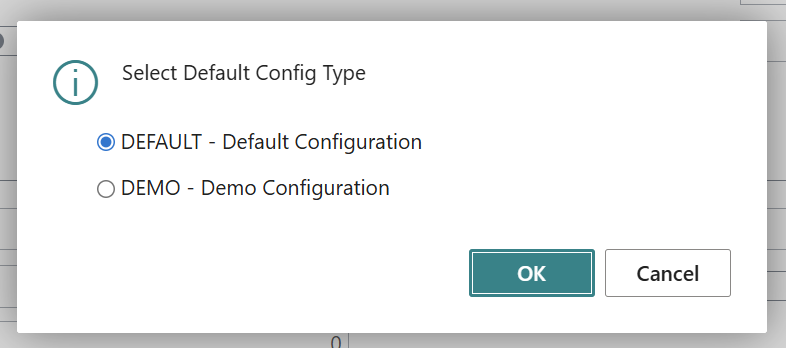
| Default Configuration |
Choose between: Default Configuration – applies standard container settings. Demo Configuration – useful for training or testing environments. Click OK to confirm your choice.
|
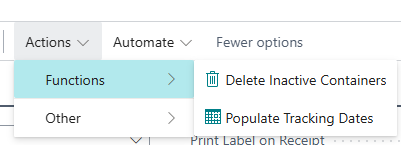
| Actions - Functions |
Opens the Functions sub menu for Delete Inactive Containers and Populate Tracking Dates.
|

Main Setup Screen
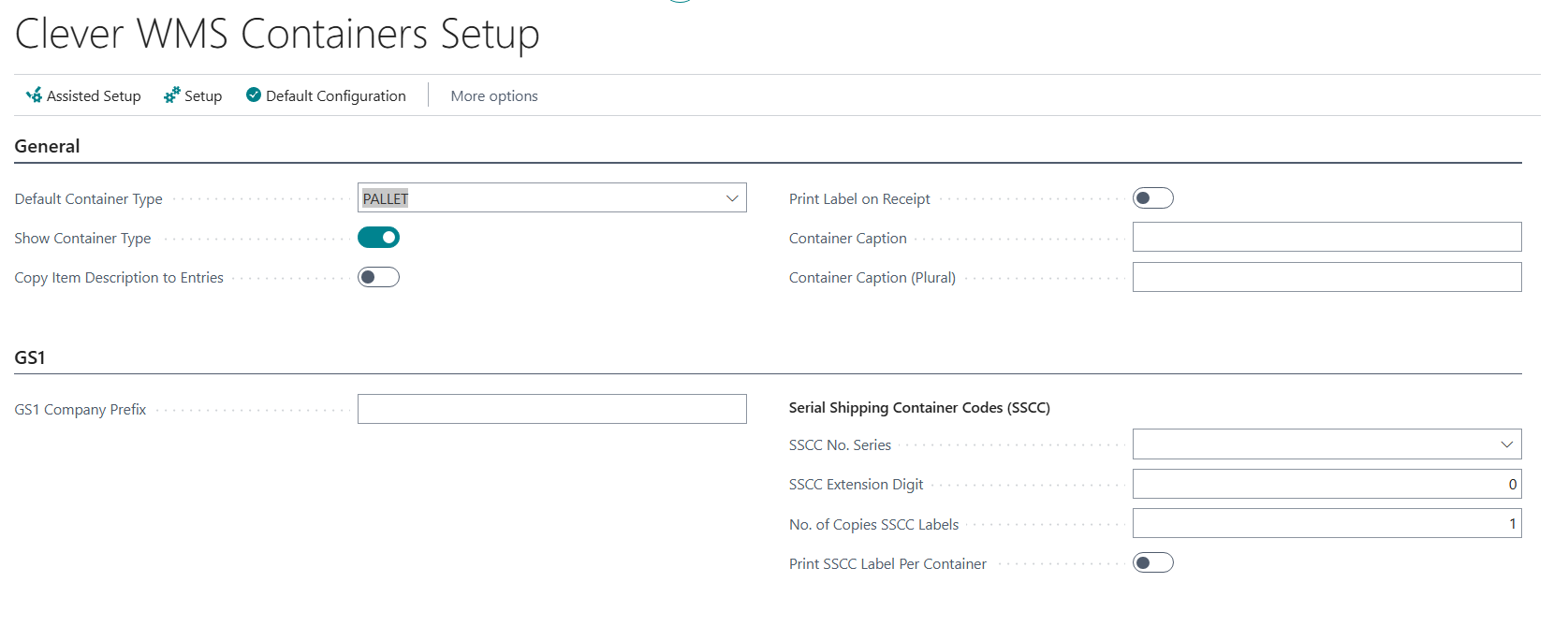
The setup screen is divided into two key sections: General Settings and GS1 SSCC Settings.
General FastTab
-
Default Container Type
A dropdown menu to select the default container used in operations (e.g. TOTE, PALLET). This type will be applied automatically unless overridden. -
Show Container Type
A toggle switch that, when enabled, displays the container type on warehouse documents and journals. This improves visibility and traceability. -
Copy Item Description to Entries
When enabled, item descriptions will automatically be copied into container entries. This is useful for improving label clarity or documentation. -
Print Label on Receipt
If enabled, a label will be printed automatically when a container is received. This supports workflows that require immediate labelling. -
Container Caption / Container Caption (Plural)
These fields allow you to customise the terminology used for containers. For example, you might enter “Pallet” and “Pallets”. This is similar to the concept of licence plating, where containers are uniquely identified and tracked.

GS1 SSCC Settings
These settings control how GS1 Prefix & Serial Shipping Container Codes are generated and managed:
- GS1 Company Prefix
Specifies your company's GS1 company identifier. This will be used to generate Serial Shipping Container Codes (SSCC) and Global Returnable Asset Identifiers (GRAI). This will have been allocated to your company by GS1.
-
SSCC No. Prefix
A custom prefix for SSCC numbers, useful for identifying containers by site, region, or type. -
SSCC No. Series
A dropdown to select the numbering series used for SSCCs. This helps maintain structured and sequential container IDs. -
SSCC Extension Digit
A numeric field used to extend the SSCC number for additional uniqueness or compliance. -
No. of Copies SSCC Labels
Specifies how many copies of each SSCC label should be printed by default. -
Print SSCC Label Per Container
When enabled, a label is printed for each container with its SSCC. This is essential for operations that rely on barcode scanning and container-level tracking.
