The App uses an Intent-based scanning service to receive barcode data directly from the Honeywell scanner (ScanWedge service). This replaces the older SDK-based method, which is now deprecated. With this approach, the app listens for broadcast Intents sent by the Honeywell ScanWedge whenever a barcode is scanned.
Benefits:
• Reliable background delivery of barcode data
• Compatibility with future Honeywell firmware versions
• No dependency on SDK libraries
Follow the steps below to configure the scanner for Intent-based communication with your app.
- Open Honeywell Scanner Settings
- Go to: Settings → Honeywell Settings
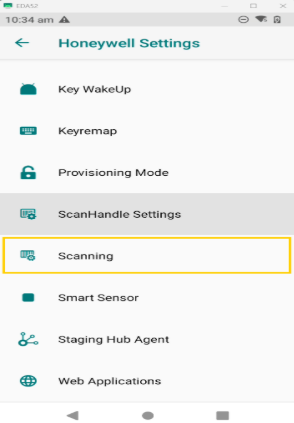
- Then tap:
Scanning → Internal Scanning → Default Profile
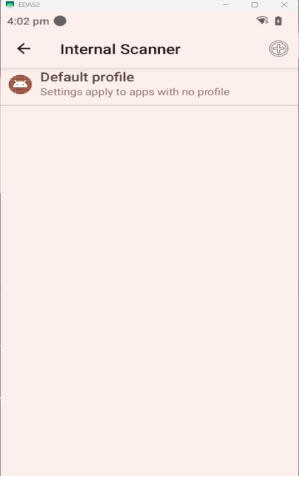
- Go to Data Processing Settings
- In the Default Profile menu, tap:
Data Processing Settings
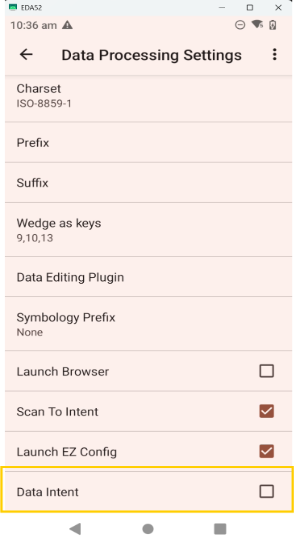
- Set Data Output to Intent
Inside Data Processing Settings, find and enable Scan to Intent.
Configure Data Intent Settings
- Tap Data Intent
- Enable Data Intent → ON
- Tap Intent Action and enter your app’s action string:
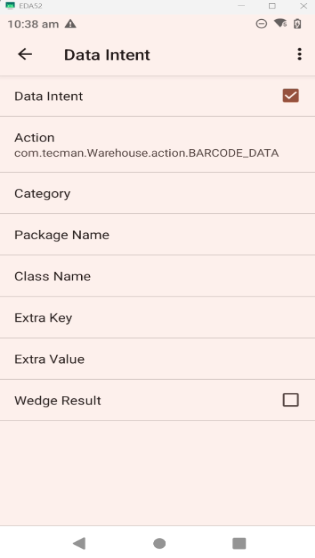
Image shows exact action needed for our app to communicate with Scanner.
- Press back to save your changes and exit settings.