There may be the instance where you wish to calculate retrospective rebates, that is, Rebate values from already posted invoices as part of existing Rebate cards. This is ideal if you wish to include values from before your Start Date or maybe where you have made a Rebate Card 'Active' part-way through a period and need to calculate the values for the whole period.
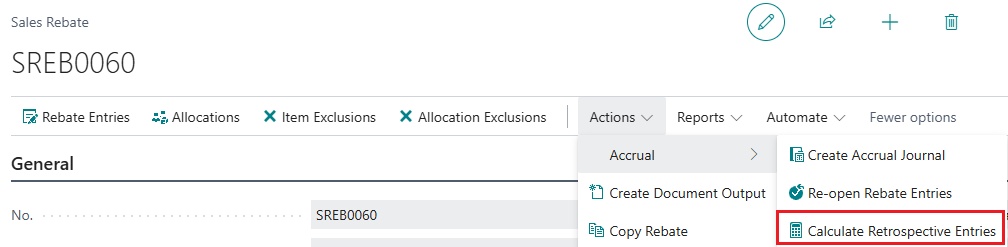
Within an existing Rebate card, go into the ribbon and click into the Actions option. Select Accrual and then click into the Calculate Retrospective Entries button.
This will then open up a screen to confirm what date range you want Business Central to look for already posted invoices to include into this rebate. So for example, my Start Date on my Rebate Card is '01/02/2026' but I want to also add all rebates dated from '01/01/2026' into the rebate entries so i've edited my Start date to include this date range.
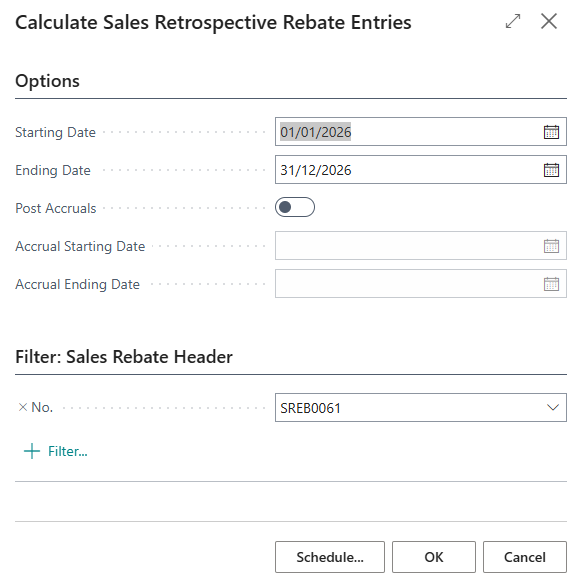
You don't really need to edit Ending Date, if Clever Rebates already created a rebate entry against an invoice, it won't re-create it again. If you want to automatically Post Accrual aswell, change the toggle to 'Yes'. This will create and post the journal posting for you and mark the newly added entries as 'Accrued'. Changing this to 'Yes' allows you to confirm what Accrual period you want to post. So for example, if you made the Rebate active in March but you were now trying to calculate the retrospective rebates for Jan and Feb also, you may only want to Accrue for January. So you can still calculate the missing entries of January and February, but only accrue for January's. Again, if a rebate entry is already marked as 'Accrued', it will not accrue it again.
Press OK or use the Schedule option to use a Job Queue to run this calculation. This will now update the Rebate Entries with all the missing entries for the date specified and Accrue them if you selected this. You'll also notice the Rebate Summary section on the Rebate Card is updated to reflect the new entries.