Configure To Order Setup
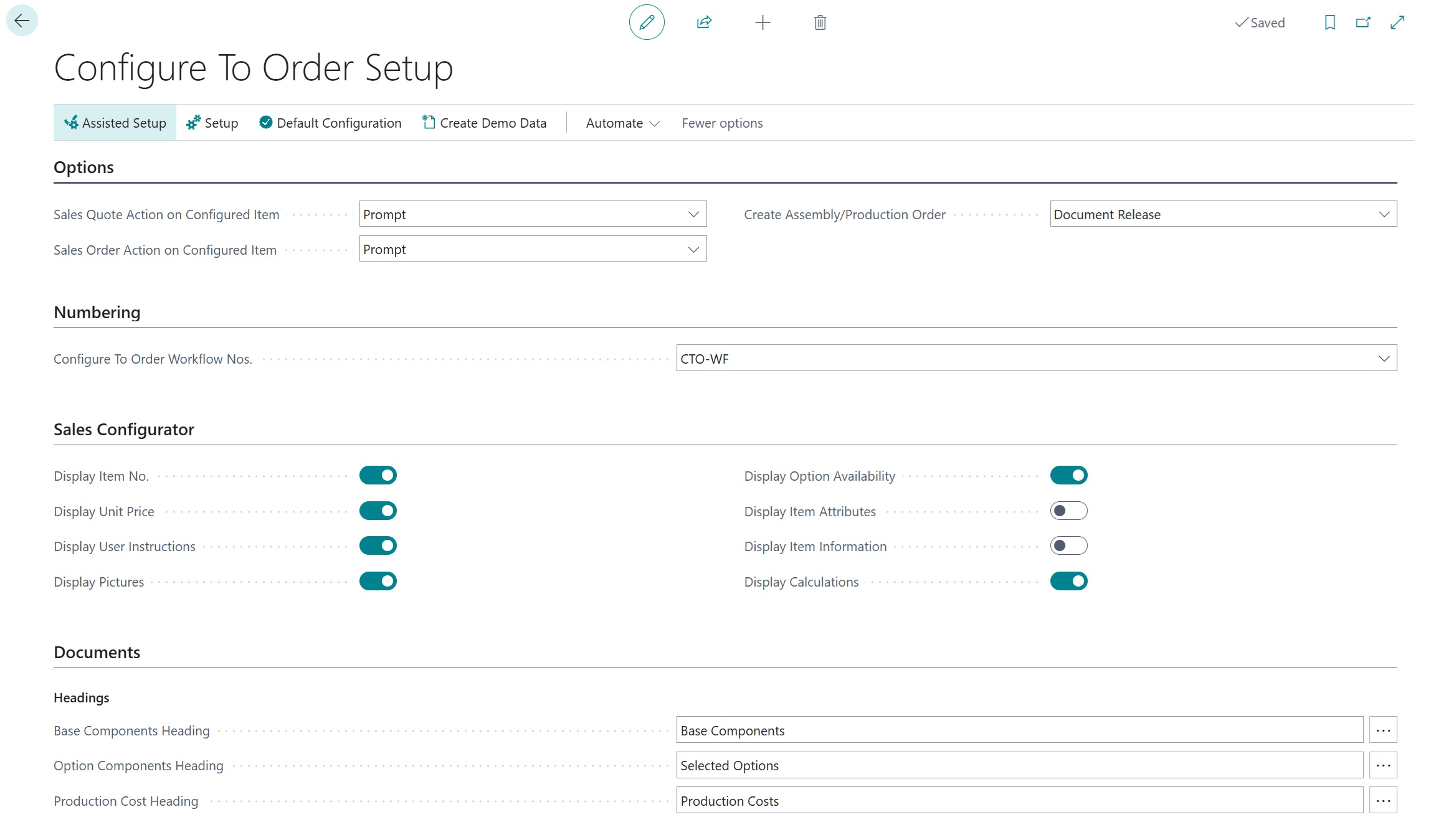
The "Configure To Order Setup" screen contains all the global settings for the Clever Configure To Order extension. Use this screen to control the behaviour of the Sales Configurator, configure number series, set document headings, and access related setup pages.
Note: If you are setting up the extension for the first time, use the Assisted Setup action or the Default Configuration action to get started quickly.
Options
These fields control the behaviour when a configurable item is added to a sales document:
| Field | Description |
| Sales Quote Action | Specifies the action to perform when a configured item is added to a sales quote. This determines whether the Sales Configurator opens automatically, prompts the user, or takes no action. |
| Sales Order Action | Specifies the action to perform when a configured item is added to a sales order. This determines whether the Sales Configurator opens automatically, prompts the user, or takes no action. |
Numbering
| Field | Description |
| CTO Workflow Nos. | Specifies the number series used for Configure to Order workflows. Each workflow is assigned a unique number from this series when created. |
Item Configurator
These settings control what information is displayed to the user on the "Sales Configurator" screen during item configuration:
| Field | Description |
| Display Item No. | Specifies if the Item No. column should be displayed on the item configurator. When enabled, a No. column appears in the options list showing the item number, resource number, or option code. |
| Display Unit Price | Specifies if the unit price should be displayed on the item configurator. When enabled, the Configured Unit Price field appears at the bottom of the page showing a running total, and an Option Price column appears in the options list. |
| Display User Instructions | Specifies if user instructions, if available, are displayed on the item configurator. When enabled, any rich-text instructions defined on a workflow step are shown in a viewer below the step heading. |
| Display Pictures | Specifies whether pictures relating to the available options are displayed on the item configurator. When enabled, the Option Picture FactBox appears in the right-hand panel showing the image associated with the current step and selected option. |
| Display Option Availability | Specifies whether component availability is displayed on the item configurator. When enabled, the Option Availability FactBox appears on Item steps, showing inventory availability for the highlighted option (quantities on hand, on order, and available). |
| Display Item Attributes | Specifies if the item attributes should be displayed on the item configurator. When enabled, the Option Item Attributes FactBox appears on Item steps, showing attribute values such as colour, size, or material for the highlighted option. |
| Display Item Information | Specifies if the item information should be displayed on the item configurator. When enabled, the Option Item Information FactBox appears on Item steps, showing detailed item card information for the highlighted option. |
| Display Calculations | Specifies if the item configuration calculations should be displayed on the item configurator. When enabled, the Calculations FactBox appears when the workflow has calculation formulas defined, showing calculated values that update as selections change. |
Documents
Headings
These fields define the section headings used on customer specification documents and printed sales documents. Each heading has an assist-edit button that opens a translations page where you can define headings in other languages.
| Field | Description |
| Base Components Heading | Specifies the heading that is used when base components are displayed on the customer specification and sales documents. Click the assist-edit button to manage translations for this heading. |
| Option Components Heading | Specifies the heading that is used when option components are displayed on the customer specification and sales documents. Click the assist-edit button to manage translations for this heading. |
| Production Cost Heading | Specifies the heading that is used when production costs are displayed on the customer specification and sales documents. Click the assist-edit button to manage translations for this heading. |
Document Delivery (Specification Document)
These fields are only visible when the Clever Document Delivery extension is installed. They specify the document type codes used for sending configuration specification documents:
| Field | Description |
| Sales Quote | Specifies the document type to use for sending sales item configurations from sales quotes via Clever Document Delivery. |
| Sales Order | Specifies the document type to use for sending sales item configurations from sales orders via Clever Document Delivery. |
| Posted Sales Shipment | Specifies the document type to use for sending sales item configurations from posted sales shipments via Clever Document Delivery. |
| Posted Sales Invoice | Specifies the document type to use for sending sales item configurations from posted sales invoices via Clever Document Delivery. |
Actions
Promoted Actions
| Action | Description |
| Assisted Setup | Opens a wizard to guide you through setting up Clever Configure to Order step by step. This is recommended for first-time setup. |
| Default Configuration | Applies a default configuration to the Clever Configure to Order setup. Use this to get started quickly - once applied, you can tailor any settings to your specific requirements. |
| Create Demo Data | Creates sample Configure to Order workflows and items for demonstration purposes. Running this action again will reset the demo data. |
Setup Actions
| Action | Description |
| Configure to Order Workflows | Opens the list of Configure to Order workflows where you can create and manage the step-by-step configuration workflows assigned to items. |
| Production Operation Prices | Opens the list of production operation prices for routing operations. Use this to define pricing for machine centre and work centre operations used in configurations. |
| Customisation Character Ranges | Opens the list of customisation character ranges. These define allowed character sets that can restrict the characters a user may enter in customisation text fields. |
| Report Selections | Opens the report selection setup for Configure to Order documents. Use this to choose which report layouts are used when printing or emailing configuration specification documents. |
Translation Actions
| Action | Description |
| Base Components Heading Translations | Opens translations for the Base Components heading used on specification documents. Add translations for each language your customers require. |
| Option Components Heading Translations | Opens translations for the Option Components heading used on specification documents. |
| Production Costs Heading Translations | Opens translations for the Production Costs heading used on specification documents. |