OTIF on the Sales Order
When a Customer has Record OTIF enabled, an OTIF FastTab is shown on the "Sales Order" screen.
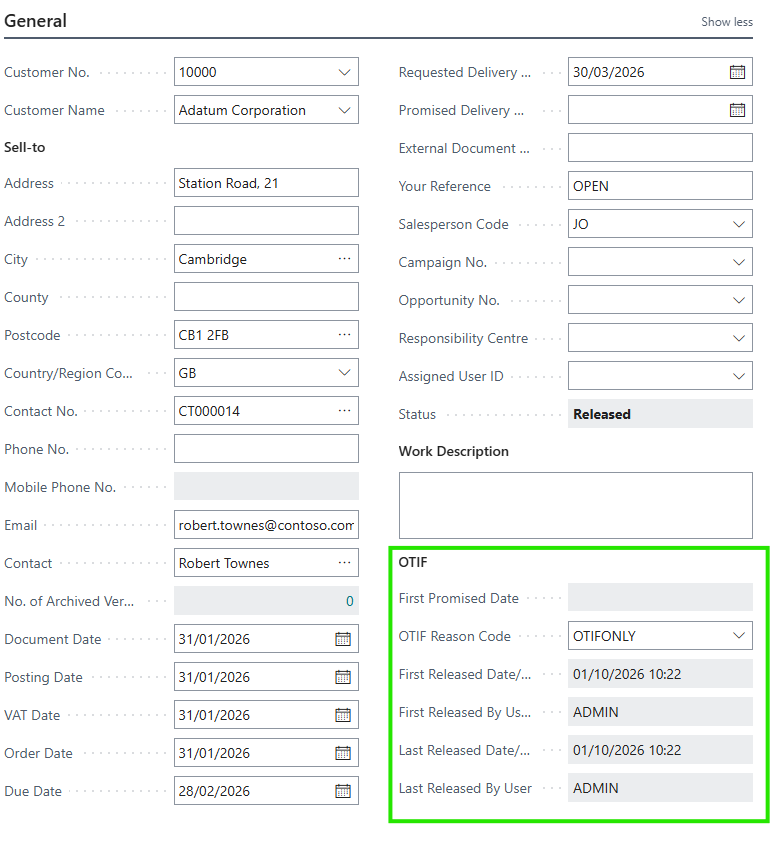
| First Promised Date |
Specifies the Promised Delivery Date captured the first time the Order was released, used as the baseline for On Time In Full reporting. This field cannot be edited. Changing the Promised Delivery Date on the Order afterwards does not change the baseline, which is what allows performance to be measured against the original promise. |
| OTIF Reason Code |
Specifies the OTIF reason code explaining why this Order is expected to fall short of an on time and in full delivery. Only Reason Codes that have been flagged with OTIF are available in the lookup. |
| First Released Date/Time | Specifies when the Order was first released. |
| First Released By User | Specifies the user who first released the Order. |
| Last Released Date/Time | Specifies when the Order was most recently released. |
| Last Released By User | Specifies the user who most recently released the Order. |
Comparing First Released Date/Time with Last Released Date/Time is a quick way to spot Orders that have been re-opened and re-released, which is often a sign that the Order was amended after the original commitment was made.
OTIF on the Sales Order lines
Two additional columns are available on the Sales Order lines.
| Original Quantity |
Specifies the quantity originally entered on this line, taken from the first Input Log entry. Compare this with the current Quantity to see how the Order has changed. This is the quantity used by the In Full measure, so a line that was reduced from 100 to 60 and then shipped in full will still be reported as short. |
| First Promised Date |
Specifies the Promised Delivery Date captured for this line the first time the Order was released. This column is hidden by default and can be added using personalisation. |
OTIF on the Purchase Order
The Purchase Order works in exactly the same way for Vendors that have Record OTIF enabled, with one difference - the baseline is taken from the Expected Receipt Date rather than the Promised Delivery Date.
| First Expected Receipt Date | Specifies the Expected Receipt Date captured the first time the Order was released, used as the baseline for On Time In Full reporting. |
| OTIF Reason Code | Specifies the OTIF reason code explaining why this Order is expected to fall short of an on time and in full delivery. |
The release audit fields (First Released Date/Time, First Released By User, Last Released Date/Time and Last Released By User) and the line level Original Quantity and First Expected Receipt Date columns behave as they do on the Sales Order.
OTIF on the Transfer Order
Transfer Orders are covered where the Transfer-from Code or Transfer-to Code refers to a Location with Record OTIF enabled. The OTIF FastTab on the "Transfer Order" screen captures a First Shipment Date and a First Receipt Date baseline together with the same release audit fields and an OTIF Reason Code.
Recording a reason on a posted document
It is not always clear at the time of posting why a delivery was short or late. For this reason the OTIF Reason Code can also be set, or changed, after the event on the posted document.
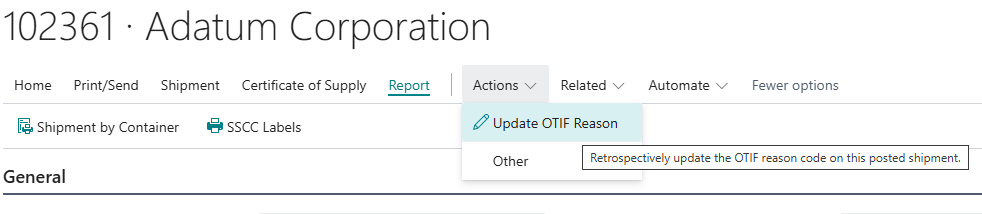
The Update OTIF Reason action is available on:
-
the "Posted Sales Shipment" screen and the "Posted Sales Shipments" screen
-
the "Posted Purchase Receipt" screen and the "Posted Purchase Receipts" screen
-
the "Posted Transfer Shipment" and "Posted Transfer Receipt" screens
Choosing the action opens a short dialog showing the document number and the trading partner, with a single editable field.
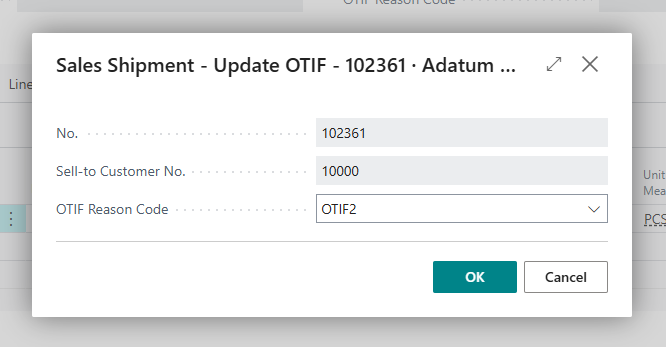
| OTIF Reason Code | Specifies the OTIF reason code explaining why this Shipment, Receipt or Transfer was not delivered on time and in full. |
The captured baseline dates and original quantities are also shown on the posted document lines, so the posted Shipment or Receipt is a complete record of both what was promised and what was actually delivered.
Note: updating the OTIF Reason Code on a posted document does not change any financial or inventory data. It only records the explanation used for delivery performance analysis.