Every landed cost that Clever Landed Costs posts is recorded on the "Landed Cost Ledger Entries" screen. Each entry is linked to the Item Ledger Entry of the stock receipt it relates to, so you can see, for every receipt, the landed costs that were expected, what has been invoiced and what is still outstanding.
You can open the "Landed Cost Ledger Entries" screen from:
-
the Tell me search in Business Central
-
the Landed Cost Ledger action on the "Landed Cost Registers" screen
-
the Ledger Entries action on the "Landed Cost Journal" screen
-
Find entries on a posted document such as a "Posted Purchase Receipt", "Posted Purchase Invoice" or "Posted Transfer Receipt", where a line called Landed Cost Ledger Entry shows the number of entries for that document
-
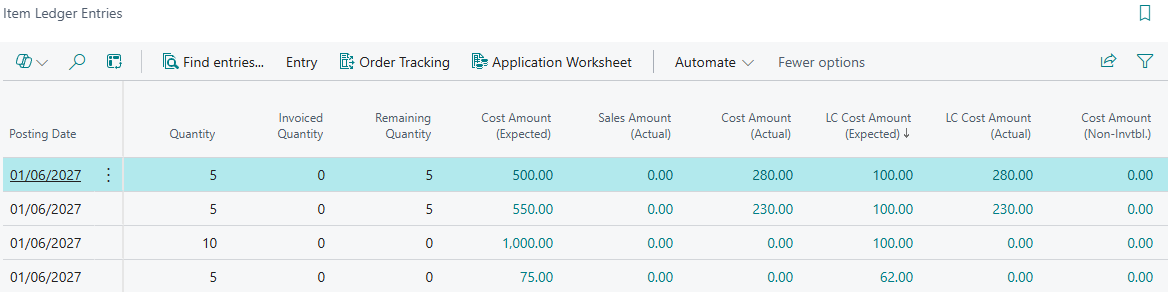
the LC Cost Amount (Expected) and LC Cost Amount (Actual) fields on the "Item Ledger Entries" screen
-
the Posted Expected Cost (LCY) and Actual Cost (LCY) fields on a "Landed Cost Container", which show the container's fixed cost entries
When you use Preview Posting on a document, the "Posting Preview" screen also includes a Landed Cost Ledger Entry line so you can review the entries before they are posted. See Financial Postings.
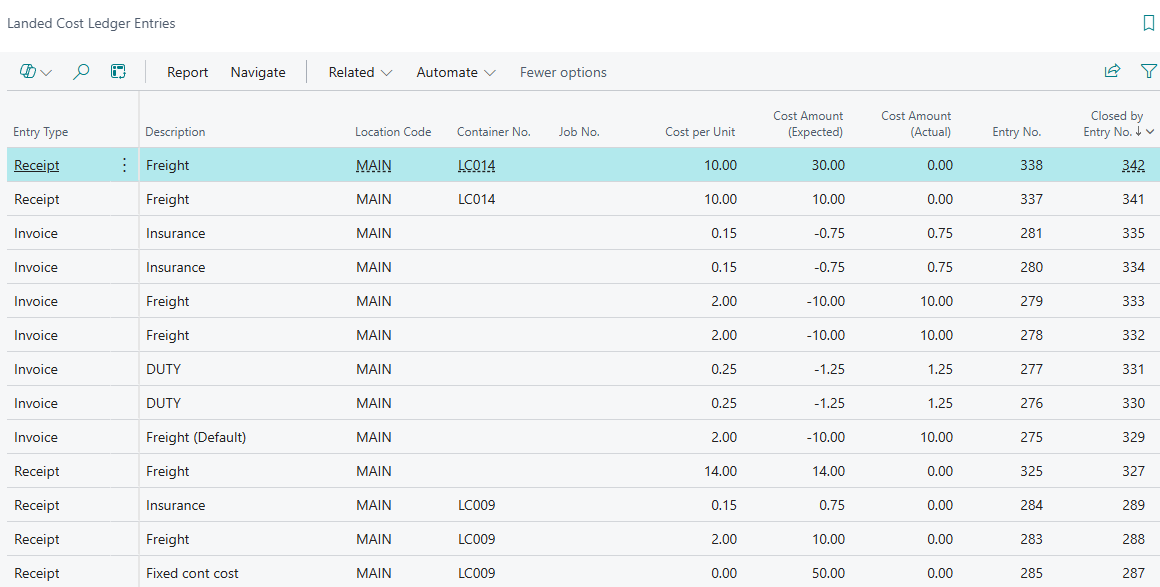
Entry Types
Each entry has one of the following Entry Types.
| Receipt | Created when a Purchase Receipt or Transfer Receipt is posted for an Item with landed costs, and when fixed costs are accrued. Holds the expected cost in Cost Amount (Expected). A Receipt entry stays open until it is closed by an Invoice or Reversal entry. When a Purchase Receipt is undone, a matching negative Receipt entry is created against the correction Item Ledger Entry and the two entries close each other. |
| Invoice | Created when a landed cost invoice is posted, or when an Invoice line is posted from the "Landed Cost Journal". Holds the actual cost in Cost Amount (Actual) and removes the expected cost with a negative Cost Amount (Expected). Posting an Invoice entry closes the open Receipt entries for the same Item Ledger Entry and Landed Cost Type. |
| Variance | Available for manual entries made on the "Landed Cost Journal". Variances between expected and actual cost are posted to the General Ledger or to the Item's Value Entries rather than as separate Variance ledger entries. |
| Reversal | Created when goods are returned on a Purchase Return Order, and when a Purchase Receipt is undone for landed costs that were not set up on the purchase line (for example container fixed costs). Holds a negative Cost Amount (Expected). When the total reversed equals the original expected cost, the original Receipt entry is closed. |
The Item Ledger Entry for the receipt has a Landed Costs Open field which is selected while it still has open landed costs. Only Item Ledger Entries with Landed Costs Open selected can have landed cost invoices assigned to them or be retrieved with Get Item Entries on the "Landed Cost Journal".
Fields
The following fields are shown on the "Landed Cost Ledger Entries" screen, in the order they appear. The newest entries are shown first.
| Entry Type | The type of entry: Receipt, Invoice, Variance or Reversal. |
| Posting Date | The posting date of the entry. |
| Item Ledger Entry No. | The Item Ledger Entry of the stock receipt that the landed cost belongs to. |
| Vendor No. | The Vendor the goods were purchased from. For Transfer Receipts this is taken from the Transfer Order, or from the Purchase Order the Transfer Order is linked to. |
| Landed Cost Vendor No. | The Vendor expected to invoice the landed cost. On Invoice entries this is the Vendor of the landed cost invoice that was posted. |
| Landed Cost Vendor Name | The name of the Landed Cost Vendor. |
| Document No. | The number of the posted document (receipt, invoice or journal document) that created the entry. |
| Landed Cost Type Code | The "Landed Cost Type" of the entry. |
| Description | A description of the entry, usually the description of the Landed Cost Type. |
| Location Code | The Location the goods were received into. |
| Container No. | The "Landed Cost Container" the goods were received on, if any. |
| Job No. | The Landed Cost Job No. of the receipt, if any. |
| Cost per Unit | The landed cost per unit. |
| Cost Amount (Expected) | The expected landed cost in your local currency. Positive on Receipt entries, and negative on Invoice and Reversal entries as the expected cost is removed. |
| Cost Amount (Actual) | The actual (invoiced) landed cost in your local currency. |
| Entry No. | The unique number of the entry. |
| Closed by Entry No. | For a Receipt entry, the number of the Invoice or Reversal entry that closed it. For a Reversal entry, the number of the Receipt entry it reverses. Blank while the entry is open. |
| Closed at Date | The date on which the entry was closed. |
The Source Type, Source Subtype, Source No. and Source Line No. fields are hidden by default and can be added with Personalise. They identify the source document line the entry came from, for example the Purchase Order or Transfer Order number and line.
Actions
| Show Document | Found in the Navigate menu. Opens the posted document for the entry: the "Posted Purchase Receipt", "Posted Purchase Invoice", "Posted Transfer Shipment" or "Posted Transfer Receipt". |
| General Ledger | Found in the Navigate menu. Opens the "General Ledger Entries" that Clever Landed Costs posted for the entry, such as accrual, reclassification and variance postings. G/L Entries that Business Central creates when posting Item Charge Value Entries are not included; view these from the Item's Value Entries. |
| Dimensions | View the dimensions of the entry. |
| Landed Cost Reconciliation | Found in the Report menu. Runs the Landed Cost Reconciliation report of outstanding expected landed costs. |
Landed Cost fields on Item Ledger Entries
The following fields are added to the standard "Item Ledger Entries" screen.
| Landed Cost Container No. | The "Landed Cost Container" the goods were received on. |
| Landed Cost Vehicle ID | The "Landed Cost Vehicle" the goods were received on. |
| Landed Cost Job No. | The Landed Cost Job No. of the receipt. |
| LC Cost Amount (Expected) | The total expected landed cost still held against the Item Ledger Entry. Drill down to see the Landed Cost Ledger Entries. |
| LC Cost Amount (Actual) | The total actual landed cost invoiced against the Item Ledger Entry. Drill down to see the Landed Cost Ledger Entries. |
| Landed Costs Open | Selected while the Item Ledger Entry still has expected landed costs that have not been invoiced, written off or reversed. |
Landed Cost field on Value Entries
The standard "Value Entries" screen has a Landed Cost field, which is selected on Value Entries created by Clever Landed Costs (the Item Charge Value Entries posted for the Charge Item Cost Treatment). The field is hidden by default and can be added with Personalise.