The "Landed Cost Reconciliation" report lists the expected landed costs that have been posted on receipt but not yet invoiced. It is designed to help you reconcile the balance of your landed cost accrual accounts at the end of a period, and to chase Landed Cost Vendors for invoices that have not yet been received.
You can run the report by searching for "Landed Cost Reconciliation" using the Tell me search in Business Central, or by selecting Landed Cost Reconciliation from the Report menu on the "Landed Cost Ledger Entries" screen.
What the report includes
The report is built from the Landed Cost Ledger Entries. An entry is included when all of the following are true:
-
the entry is still open (it has no Closed by Entry No.)
-
no actual cost has been posted on the entry (Cost Amount (Actual) is zero)
-
the Cost Amount (Expected) is greater than zero
In practice this means the receipt entries whose landed cost has not yet been invoiced, written off on the "Landed Cost Journal" or reversed.
Filters
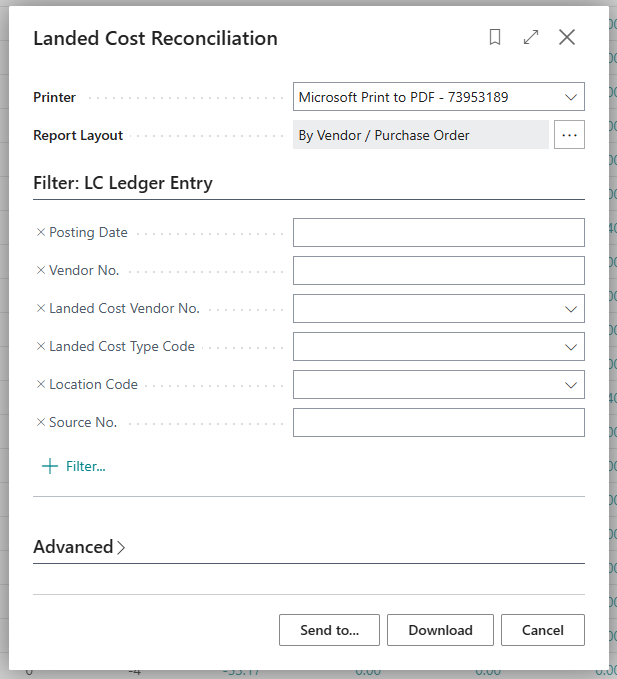
The following filters are available on the request page. Use the Posting Date filter to report on the costs that were outstanding up to a period end.
| Posting Date | The posting date of the receipt entries to include. |
| Vendor No. | The Vendor the goods were purchased from. |
| Landed Cost Vendor No. | The Vendor expected to invoice the landed cost. |
| Landed Cost Type Code | The "Landed Cost Type" to include. |
| Location Code | The Location the goods were received into. |
| Source No. | The source document number, for example the Purchase Order No. |
Layouts
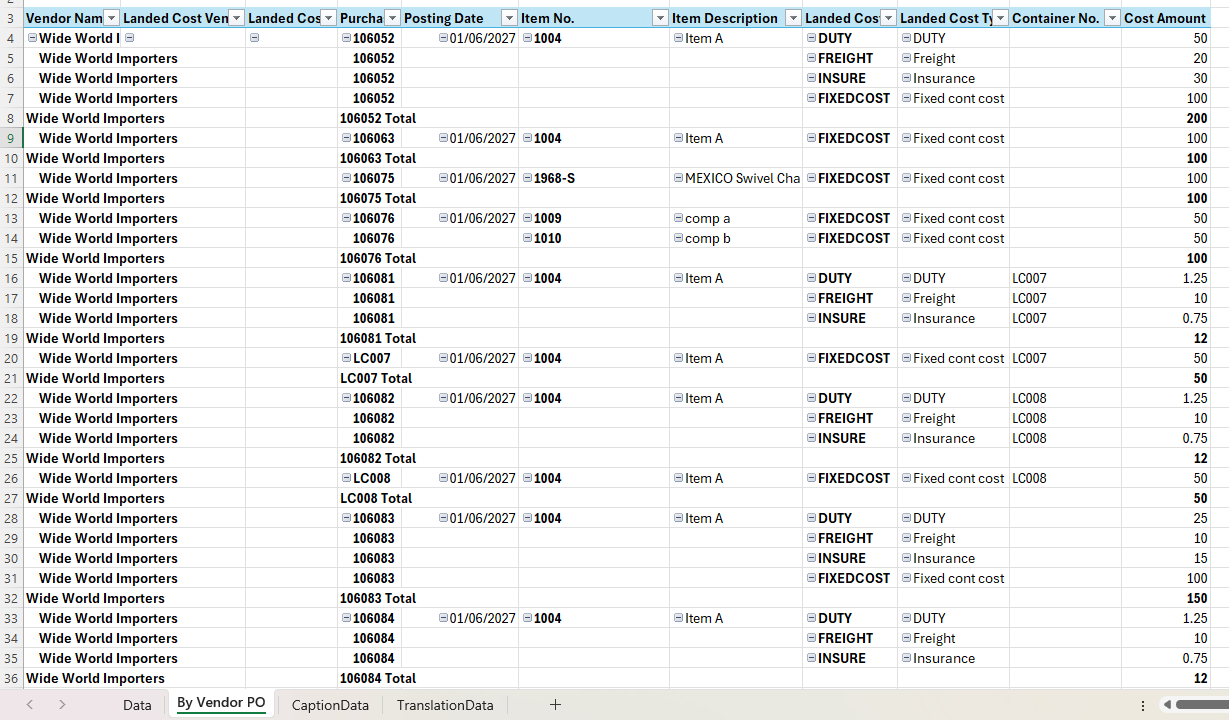
The report produces an Excel workbook. Two layouts are available, and you can choose between them using the layout options on the request page.
| By Vendor / Purchase Order | The default layout. Groups the outstanding landed costs by Vendor and Purchase Order with subtotals. The pivot sheet shows the Vendor Name, Landed Cost Vendor, Source No., Posting Date, Item, Landed Cost Type and Container No. for each cost. |
| By Landed Cost Type | Groups the outstanding landed costs by Landed Cost Type with subtotals. The pivot sheet shows the Landed Cost Type, Landed Cost Vendor, Posting Date, Vendor, Source No., Item and Container No. for each cost. This layout is useful for reconciling each Landed Cost Type's accrual account. |
Both layouts also contain a Data sheet with one row per outstanding entry, which you can filter and analyse in Excel.
Report columns
The Data sheet contains the following columns.
| Entry No. | The Landed Cost Ledger Entry number. |
| Posting Date | The posting date of the receipt. |
| Vendor No. | The Vendor the goods were purchased from. |
| Vendor Name | The name of the Vendor. |
| Source No. | The source document number of the entry. This is the Purchase Order No. for purchase receipts. For Transfer Receipts it is the Transfer Order No., and for container fixed costs it is the Container No. |
| Item No. | The Item received. |
| Item Description | The description of the Item. |
| Landed Cost Type Code | The "Landed Cost Type" of the cost. |
| Landed Cost Type Description | The description of the Landed Cost Type. |
| Category Code | The "Landed Cost Category" assigned to the Landed Cost Type. |
| Container No. | The "Landed Cost Container" the goods were received on. |
| Location Code | The Location the goods were received into. |
| Cost Amount | The outstanding expected landed cost in your local currency. |
| Global Dimension 1 Code and Global Dimension 2 Code | The global dimension values of the entry. |
| Landed Cost Vendor No. | The Vendor expected to invoice the landed cost. |
| Landed Cost Vendor Name | The name of the Landed Cost Vendor. |
Note: the report shows the outstanding expected cost held in the Landed Cost Ledger. If you have made manual adjustments to the accrual accounts using a General Journal, these will not appear on the report and will need to be taken into account when you reconcile.