Credit Classification Codes let your business define its own set of labels to describe the standing of a customer account, such as Legal Started, Liquidated, Bad Debt Written Off or Credit Watch. A Credit Classification is assigned manually by a Credit Controller and reflects human judgement, giving you a way to identify, filter and prioritise distressed accounts alongside the system-calculated Account Status.
The Credit Classification is completely independent of the Account Status (Blank, Overdue, Over Credit Limit or Blocked). Both coexist and serve different purposes, one driven by the system and the other by the Credit Controller. For more information on the Account Status, see the Customer Card.
Setting Up Your Classification Codes
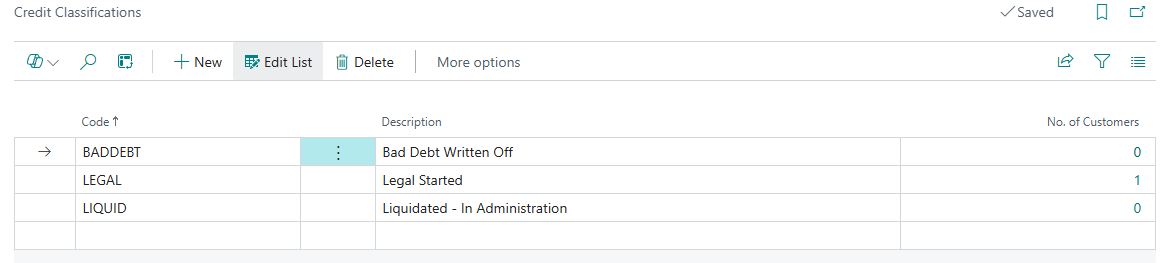
Typing “Credit Classifications” in the search within BC, or opening it from the “Credit Control Setup” screen, will allow you to view and maintain your classification list. The list is blank on installation, encouraging you to define only the codes that are relevant to your business. There is no upper limit on the number of codes you can create.
Choose New and populate the following for each entry.
| Code | A short, easy to understand code for the classification, for example LEGAL. This is the value that will be stamped against the customer. |
| Description | A fuller description for the classification, for example Legal Started. |
| No. of Customers | A display-only count of how many customers are currently assigned this classification. Clicking into the value will show the customers concerned. |
Codes and descriptions can be created, edited and deleted freely as your business needs change. To protect your data, a classification that is assigned to one or more customers cannot be deleted.
Note: a classification that is in use cannot be deleted. Clear the classification from the relevant customers first if you need to remove it.
Assigning a Classification to a Customer
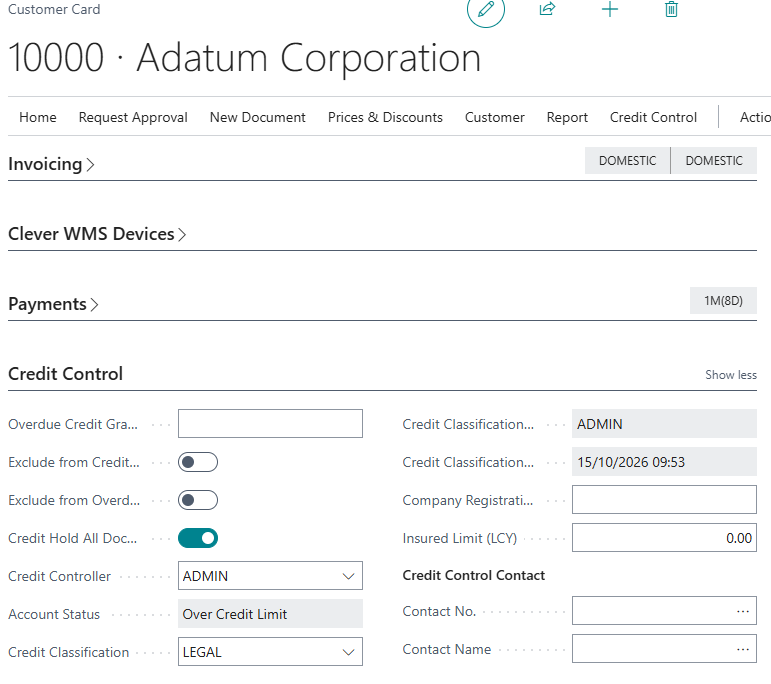
Open a “Customer” Card and go to the Clever Credit FastTab. Use the Credit Classification field to select a value from your classification list. The field is a lookup only, so users choose from the codes you have defined rather than free-typing.
The classification is set and cleared manually and is never calculated or overwritten by the system, so it can be changed or removed at any time as a customer's situation evolves.
Because classifications such as Liquidated or Bad Debt Written Off represent significant decisions, Clever Credit records who last changed the classification and when. The Credit Classification Changed By and Credit Classification Changed At fields are updated automatically whenever the classification is changed and are display-only.
Viewing and Filtering Classifications
The Credit Classification is available on the “Customer Credit Status” screen, the “Customer” Card and the “Customers” List.
On the “Customer Credit Status” screen it is available as an optional column, added via the Personalise function so that it does not clutter the view for businesses that are not using it. Like the other columns it can be filtered, so a Credit Controller can instantly pull up every customer classified as, for example, Legal Started.